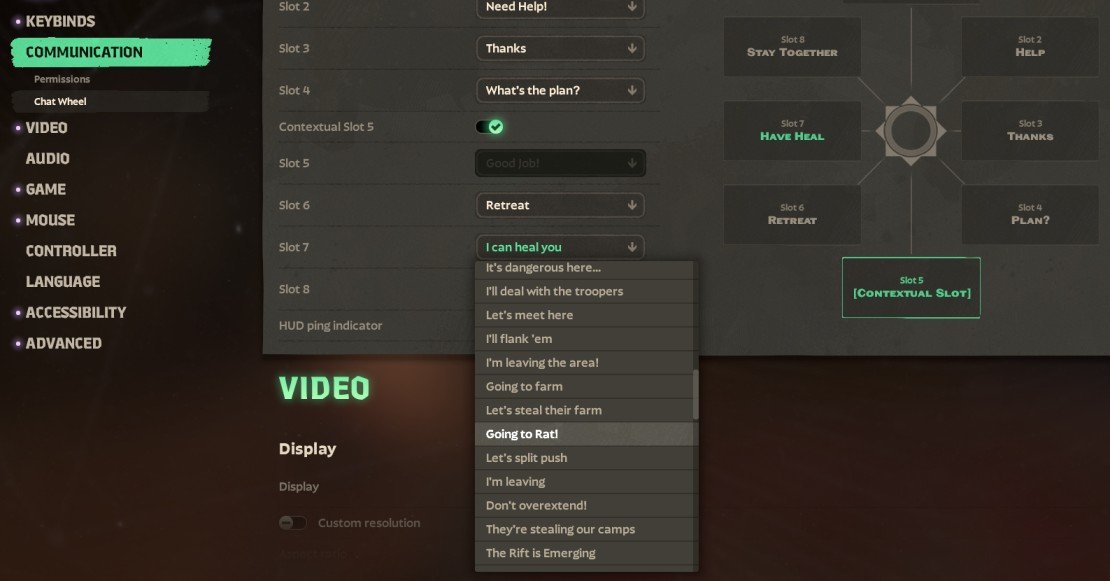

Deadlock’s in-game chat wheel is essential for quick communication among teammates, especially during intense moments where typing isn’t an option. While some phrases appear in the default menu, unlocking the full range of commands requires using specific phrase IDs through the console, giving you a strategic edge in coordination.
The chat wheel contains 8 slots, numbered from 0 to 7. These slots correspond to different quick-phrase positions on the wheel, starting at the top and moving clockwise. Using the console, you can assign any known phrase to these slots, broadening your tactical communication options.
How to Change Deadlock Chatwheel Phrases
To customize your chat wheel, begin by opening the console interface, which is accessed by pressing F7. This console is where you’ll input commands to assign phrases.
The command to change phrases follows the format:
ping_wheel_phrase_<slot> <ID>Here, the slot number ranges from 0 at the top position on the wheel clockwise to 7. You'll need to specify both the slot and the phrase ID exactly.
For instance, if you want to set the phrase “Going to farm”, which has an ID of 61, to the top slot (slot 0), enter:
ping_wheel_phrase_0 61You can also query which phrase is assigned to a particular slot simply by entering the slot command without a phrase ID. For example:
ping_wheel_phrase_0
ping_wheel_phrase_0The game remembers your customizations, so you don’t need to reapply them every time you launch Deadlock, letting you focus on gameplay rather than resetting commands.
Example Custom Chatwheel
A solid custom chat wheel setup looks like this:
ping_wheel_phrase_0 109
ping_wheel_phrase_1 114
ping_wheel_phrase_2 66
ping_wheel_phrase_3 119
ping_wheel_phrase_4 158
ping_wheel_phrase_5 61
ping_wheel_phrase_6 116
ping_wheel_phrase_7 172
This lineup includes key tactical phrases such as “Let’s attack here,” “I’m with you,” “Don’t overextend!,” “Watch out!,” “Wait,” “Going to farm,” “My Ultimate is ready,” and “Look here!”—each vital for clear team coordination in battles.
If you ever want to revert to the default chat wheel, simply restore it through the game’s settings menu without having to manually reset each slot.
All Deadlock Chatwheel Phrase IDs
Certain phrases open submenus offering more specific choices. These submenu IDs are listed beneath their main phrase for easy reference.
Original Phrases
- 1 — “Going In”
- 2 — “Need Help!”
- 3 — “Yes!”
- 4 — “Thanks”
- 5 — “Retreat”
- 6 — “Stay Together”
- 7 — “Defend Lane…”
- 8 — “York”
- 9 — “Greenwich”
- 10 — “Broadway”
- 11 — “Purple”
- 12 — “Be right back!”
- 17 — “No!”
- 18 — “Good Job!”
- 19 — “Good Game!”
- 20 — “Well Played!”
- 21 — “Thanks!”
- 22 — “Good Job!” (post-game all chat only)
- 23 — “On my Way”
- 24 — “Push Lane…”
- 25 — “York”
- 26 — “Greenwich”
- 27 — “Broadway”
- 28 — “Purple”
- 29 — “Spotted <hero>” (context only)
- 30 — “Careful” (context only)
- 31 — “<hero> is missing” (context only)
- 32 — “Heal Please”
- 33 — “I can heal you” (context only)
- 34 — “What’s the plan?”
- 42 — “Headed to Lane…”
- 38 — “York”
- 39 — “Greenwich”
- 40 — “Broadway”
- 41 — “Purple”
- 43 — “Help me deliver the urn” (older version of ID 125)
- 44 — “You’re Welcome”
- 45 — “Sorry”
- 46 — “Going to Shop”
- 47 — “Come with Me!”
- 48 — “Going to Gank”
- 49 — “Rejuv’s Dropping”
- 50 — “Cover me!”
- 51 — “Never mind”
- 52 — “I’m not ready for a teamfight”
- 53 — “We need to press the advantage!”
- 54 — “Let’s hide here”
- 55 — “It’s dangerous here…”
- 56 — “I’ll deal with the troopers”
- 57 — “Let’s meet here”
- 58 — “I’ll flank ’em”
- 59 — “Pregame pings” (not usable)
- 60 — “I’m leaving the area!”
New Phrases
- 61 — “Going to farm”
- 62 — “Let’s steal their farm”
- 63 — “Going to Rat!”
- 64 — “Let’s split push”
- 65 — “I’m leaving”
- 66 — “Don’t overextend!”
- 67 — “They’re stealing our camps”
- 68 — “The Rift is Emerging”
- 69 — “Rift Here!”
- 70 — “Mid Boss is Here”
- 71 — “Let’s go for the Rejuvenator”
- 73 — “Let’s go this way”
- 74 — “Push Guardian…”
- 75 — “York”
- 76 — “Broadway”
- 77 — “Greenwich”
- 78 — “Purple”
- 79 — “Defend Guardian…”
- 80 — “York”
- 81 — “Broadway”
- 82 — “Greenwich”
- 83 — “Purple”
- 84 — “Push Walker…”
- 85 — “York”
- 86 — “Broadway”
- 87 — “Greenwich”
- 88 — “Purple”
- 89 — “Defend Walker…”
- 90 — “York”
- 91 — “Broadway”
- 92 — “Greenwich”
- 93 — “Purple”
- 94 — “Push Base Guardian…”
- 95 — “York”
- 96 — “Broadway”
- 97 — “Greenwich”
- 98 — “Purple”
- 99 — “Defend Base Guardian…”
- 100 — “York”
- 101 — “Broadway”
- 102 — “Greenwich”
- 103 — “Purple”
- 104 — “Push the Patron”
- 105 — “Defend the Patron”
- 106 — “Push the Shrine”
- 107 — “Defend the Shrine”
- 109 — “Let’s attack here”
- 110 — “Let’s defend here”
- 111 — “Attack <hero>”
- 112 — “Ignore <hero>”
- 113 — “Careful”
- 114 — “I’m with you”
- 115 — “Are you ready?”
- 116 — “My Ultimate is ready” / “<hero>’s Ultimate is ready”
- 117 — “My Ultimate is on cooldown” / “<hero>’s Ultimate is on cooldown”
- 118 — “Heading here”
- 119 — “Watch out!”
- 120 — “Going to the Urn”
- 121 — “Going to base”
- 122 — “Going to push”
- 123 — “Going to defend”
- 125 — “Help deliver the Urn”
- 126 — “They have the Urn!”
- 139 — “Stick with me”
- 154 — “No Problem”
- 158 — “Wait”
- 159 — “Going to The Broker”
- 167 — “Sinner’s Sacrifice is here”
- 168 — “They’re going for the Rejuvenator”
- 169 — “They’re taking our Patron”
- 171 — “Okay”
- 172 — “Look here!”
Context-Only Phrase IDs
Some phrases are automatically triggered when pinging specific in-game elements like a hero, item, shop, lane, or objective. These don’t sit in regular chat wheel slots but activate contextually during gameplay, adding nuance to your team pings.