


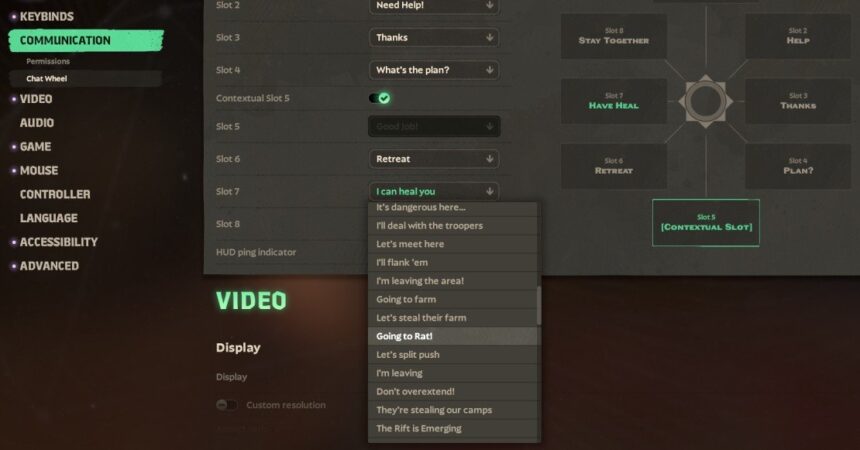
This quirky little addition in Deadlock lets you signal your teammates with the phrase “I’m gonna rat”, a fun way to announce your intent to make a sneaky play off the main fight. Setting up this voice line adds a bit of personality and strategy to your matches, helping your squad anticipate when you’re about to split off for a stealthy objective.
The voice line called Going to Rat! lives in the Communication settings. Assign it to your Chat Wheel, and pressing the middle mouse button during a game triggers your character to shout it out loud, giving your team a heads-up without breaking focus.
How to Add “Going to Rat!” to the Chat Wheel
Getting this voice line ready to use is straightforward. Just follow these steps carefully to ensure you can call it out anytime:
- Open Settings in Deadlock.
- Navigate to the Communication section.
- Select any empty slot on the Chat Wheel.
- Open the Chat Wheel dropdown menu.
- Scroll through and find the option labeled Going to Rat!
- Click to assign this voice line to the chosen slot.
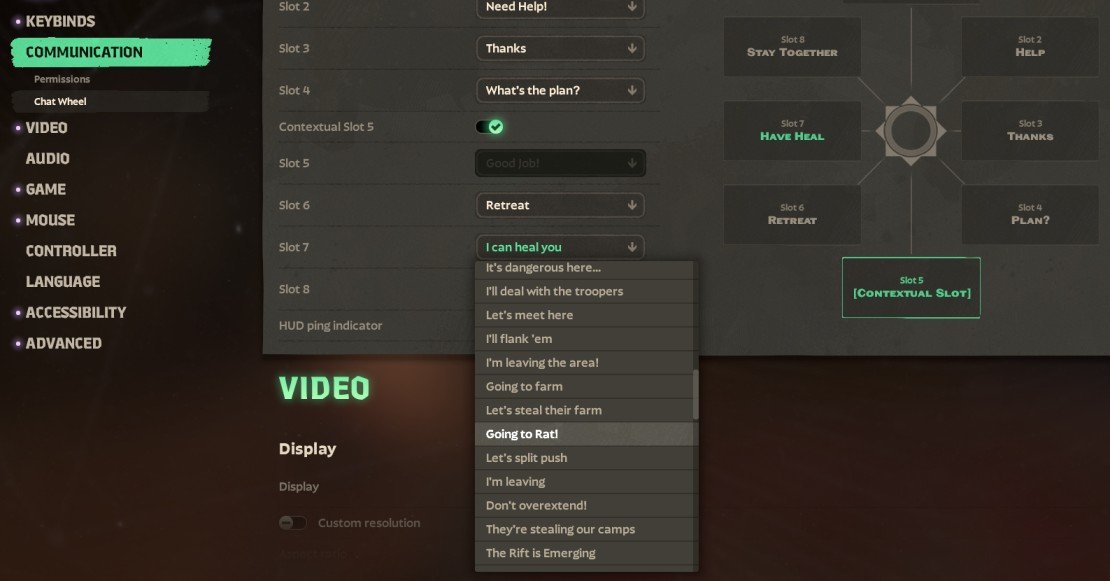
Remember, you can pick any available slot that feels most comfortable for your gameplay style.
How to Use the “I’m Gonna Rat” Voice Line
After you’ve assigned the voice line, using it in a match is quick and intuitive. Just hold down the middle mouse button to bring up your Chat Wheel and move your cursor to the Going to Rat! option.
Release the button to have your character say “I am going to Rat!” The voice will vary since it uses the currently selected hero’s lines, adding a nice touch of individuality to the call-out.
Each hero’s voice can make this simple phrase sound quite different, helping keep matches fresh and full of character.
Does Every Character Say “I’m Gonna Rat”?
While the “Going to Rat!” line is broadly available, it’s not universal. Deadlock’s voice line updates occasionally leave out some characters, so check your hero’s set before counting on it.
For example, Sinclair currently doesn’t have the updated voice line, so you won’t hear it from that character.
Can You Spam the Rat Voice Line?
This voice line respects a cooldown like all others in Deadlock, preventing it from being spammed endlessly. It keeps communication clear and prevents annoyance during intense matches.
You’ll need to wait between uses, so use it wisely for those key moments when your team really needs to know you’re splitting off.
It’s primarily a cheeky way to communicate a strategic move, not a soundboard for constant chatter.
What Does “Ratting” Mean in Deadlock?
In Deadlock, ratting is about avoiding the main team fight and sneaking around to gain an advantage elsewhere on the map. It’s essentially a lone wolf strategy aiming for objectives rather than direct confrontation.
This could be pushing a lane solo, sneaking a powerful objective, or trying to catch the enemy off guard far from the chaos of battle.
The term is borrowed from competitive gaming vernacular, where “ratting” means staying out of sight and out of harm’s way to chip away at your opponent’s resources or positioning.